
Articles
Using AI Doesn’t Change the Path to Building Apple Apps
The advent of AI has changed the landscape of development and the way we work. But it hasn’t changed the fundamentals or what it takes to continue doing a good job. In this article, we’ll walk you through, step by step, the 21 steps you need to take to create Apple apps. It doesn’t matter whether you use AI or not. AI is just the method for that step, but that step itself is essential.
Read the article or listen to it as a podcast in the app. Download Be Native now.


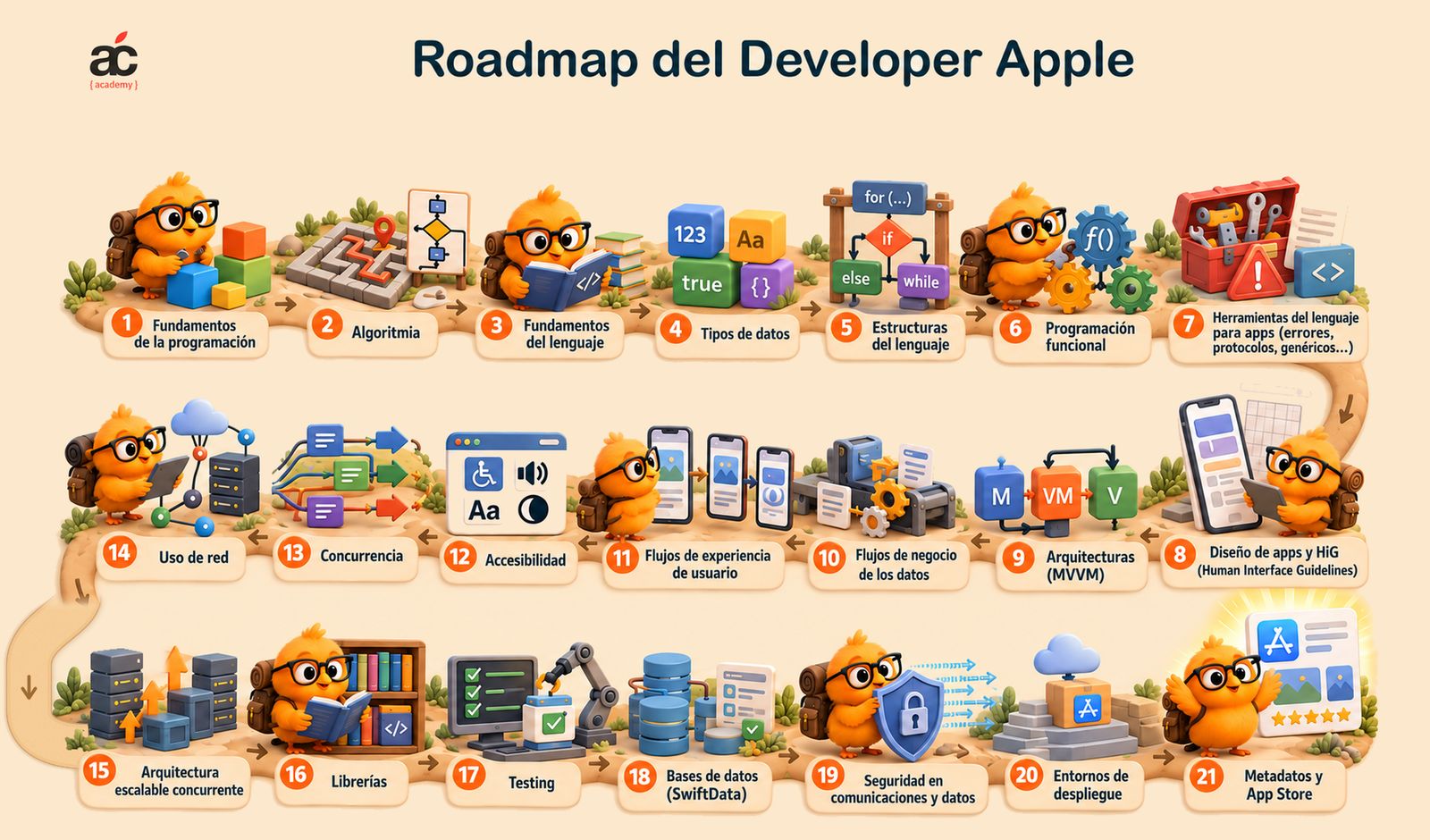
You can write every line by hand, work with an assistant, or ask an agent to build the app. You can even do vibe coding and accept whatever it generates without reviewing the code. Your level of involvement changes. What the app needs to work properly stays the same.
Data needs structure. Operations can fail. The interface needs to stay responsive while information arrives. And people need to be able to use the result without guessing how it works. None of those needs disappears because AI wrote the code.
That is the point of this roadmap: to show the complete path, from the fundamentals to the App Store. We can delegate the steps, but we cannot eliminate the needs they address. If we do not handle them ourselves, the tool we use will have to. And if nobody does, what remains is an unresolved problem, not a shortcut.
These are 21 connected steps. That does not mean studying all the theory before building anything, or treating each step as a separate compartment. We learn by doing, revisit earlier decisions, and make corrections. But the path is still the same.
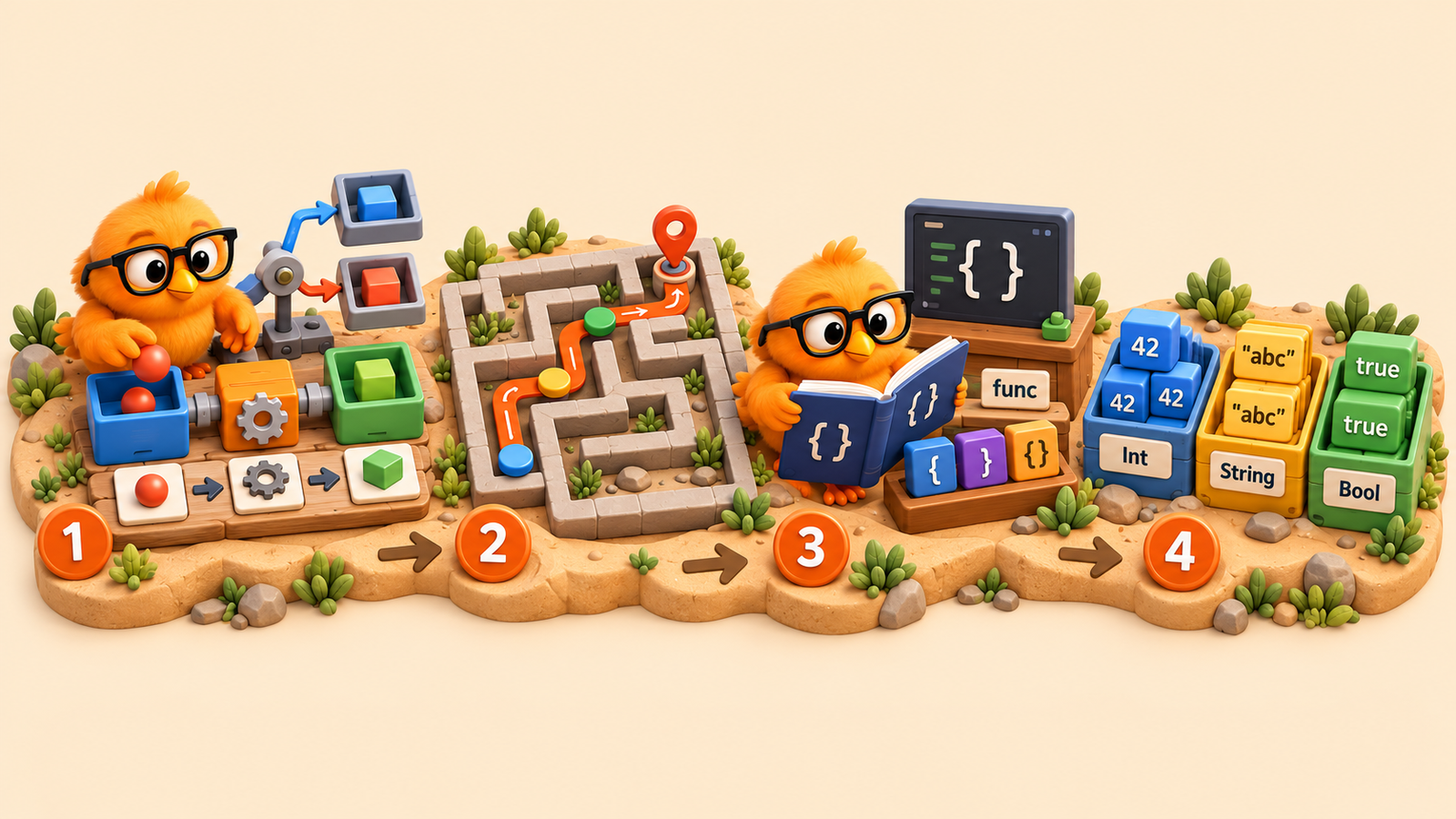
1. Programming fundamentals
A program takes in information, makes decisions, and produces results. Before worrying about Swift, we need to understand those mechanics: storing a value, comparing two things, repeating an operation, or breaking a problem into smaller ones. That is how we move from “I want an app that does this” to explaining what actually needs to happen. Without that foundation, we can ask for a result, but we lack the judgment to tell whether we have really achieved it.
2. Algorithmic thinking
Saying “sort this list” expresses an intention. Deciding how to sort it solves the problem. Algorithmic thinking teaches us to develop those procedures and assess how much work they require. We do not need to turn every screen into a mathematics exercise, but we do need to understand why repeatedly scanning thousands of items to find a value can be a poor choice.
3. Language fundamentals
Now we need to express those ideas in Swift. Declarations, functions, parameters, scopes, and optionals are part of its vocabulary. An optional, for example, lets us represent the possibility that a value is absent, rather than pretending it will always be available. Learning the language is not about memorizing syntax. It is about describing a problem precisely and understanding what the compiler is telling us when something does not fit.
4. Data types
A price, a date, and a person’s name are not interchangeable pieces of information. Types let us represent those differences and restrict operations to those that make sense. Collections, structures, enumerations, and classes then let us organize more complete models. Good modeling saves us from scattering checks throughout the app to catch mistakes we could have prevented at the outset. Data does not become correct just because a screen displays it nicely.
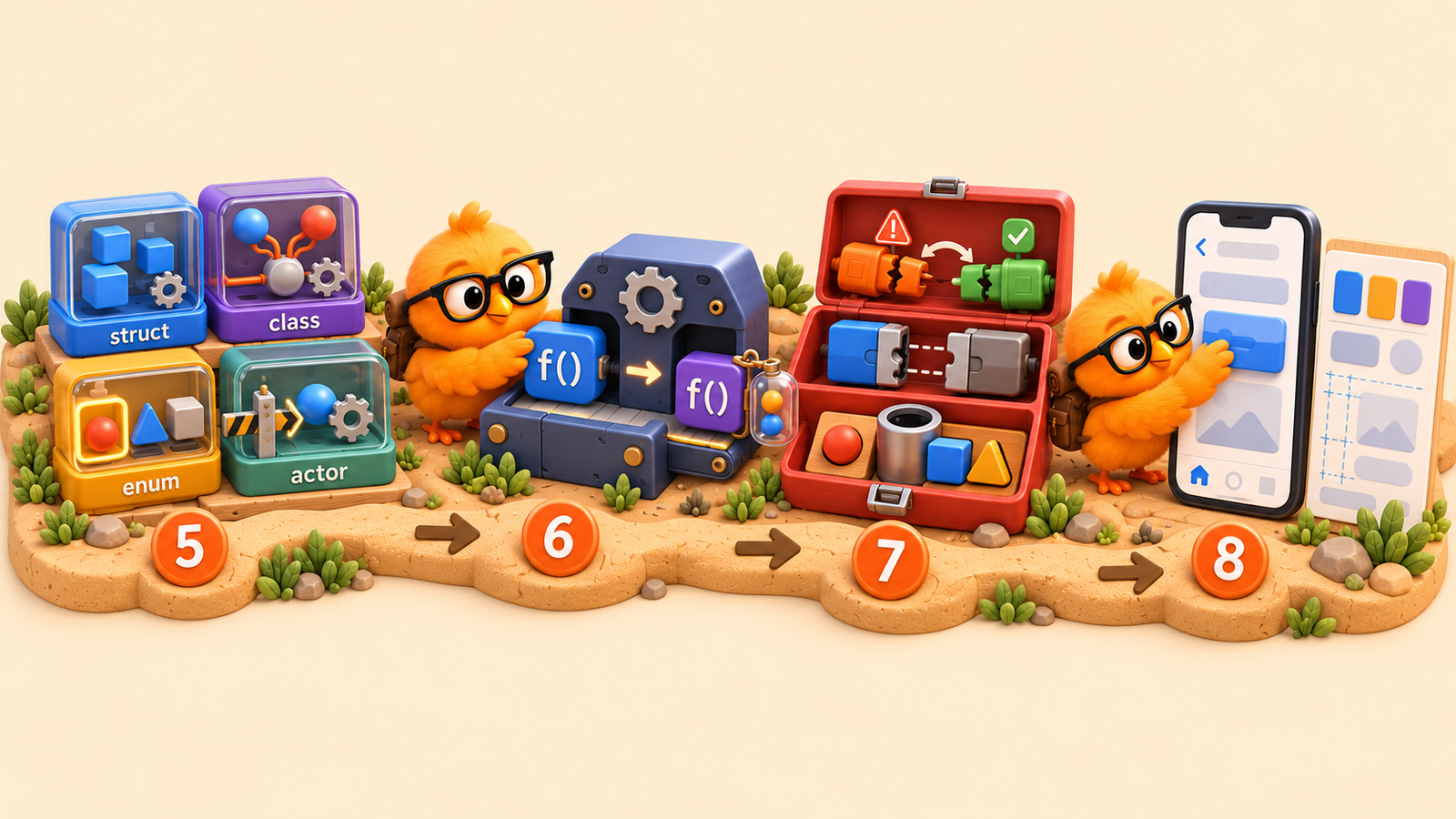
5. Language constructs: defining your own types
Swift lets us define our own types: struct to model values, class for objects with identity and reference semantics, enum to express alternatives, and actor to isolate mutable state. A booking stops being a handful of unrelated variables and becomes a concept with data and behavior. That is abstraction: representing what matters about the problem and hiding details that other parts do not need to know. Choosing these constructs well lets us reason about each piece without having to understand the entire app at once.
6. Functional programming
In Swift, a function is also a value with a type: we can store it, pass it as an argument, or return it from another function. Closures let us express that behavior and capture the surrounding context. The shift in mindset is to pass not just data, but also the behavior to apply to it. A validation function can receive the rule it should apply instead of having that rule hard-coded inside it. This separates the mechanism from the behavior, allowing us to combine them without duplicating the solution.
7. Language tools for app development
Error handling, protocols, and generics start to make sense when we move beyond isolated examples. We need to communicate that an operation has failed, define what a component must provide, or reuse a solution while preserving type safety. These tools let pieces work together without depending on all of one another’s internal details. That is why they matter: they help us build an app that can evolve, not just an example that happens to run.
8. App design and the HIG
A screen can look impressive and still be awkward to use. Apple’s Human Interface Guidelines help us understand how to build an experience that feels coherent on the platform: navigation, visual hierarchy, controls, and feedback in response to actions. They are not a catalog of screens to copy. They give us criteria for helping people recognize what they can do and what is happening, without first having to learn the quirks of our own design ideas.

9. App architecture: MVVM
When the interface, state, and operations become tangled together, any change can affect far too much. Architecture organizes those responsibilities. MVVM, which separates the model, view, and view model, is one way to approach the problem. The point is not to accumulate folders or impose an acronym on every project. It is to be able to find where a decision is made, change it, and test it without pulling apart half the app. That remains true when AI proposes the structure. Dependency injection, reuse, and separating each part into an independent unit let us scale the app and allow it to grow without becoming an unmanageable monster.
10. Business logic and data flows
Before deciding how to present an operation, we need to understand what it means. Confirming a booking, for example, requires checking availability, applying rules, and keeping the outcome consistent. Those are business decisions, even when no money is involved. They define where data comes from, what conditions it must satisfy, and how it changes. If those rules are wrong, a flawless interface will simply do a better job of presenting an incorrect operation.
11. User journeys
Now we need to turn that operation into a journey a person can complete. How does it begin? What do they see while they wait? Can they cancel? How do they recover from an error? The business flow describes what should happen; the user journey describes how the person using the app experiences it. A booking may have been saved correctly and still prompt a second attempt if we never show that the first one was confirmed.
12. Accessibility
Text size, contrast, reading order, and VoiceOver labels determine who can use an app. They are not finishing touches we add at the end to tick a box. They are part of how we design controls and communicate information. If we indicate an error only through a color change, we have already excluded some users. Addressing accessibility from the beginning means building the app properly, rather than creating a special version later.

13. Concurrency
We need to understand how our app runs internally: which work can progress concurrently, how that work is separated, and which state belongs to each isolation domain. A data race occurs when concurrent accesses to the same memory are not synchronized and at least one of them modifies its contents. Swift’s strict concurrency checking uses isolation and data-transfer rules to detect unsafe accesses before the app runs. This is not just about doing several things at once. It is about preventing them from interfering with one another and causing bugs that are difficult to reproduce.
14. Networking
The asynchronous URLSession APIs, used with async/await, let us wait for a response without blocking the thread running the task. But a request has to fit into our app’s concurrency configuration. We need to decide where the response is processed, keep expensive computation off the main actor, and update UI state on that actor. We also need to handle errors and cancellation while respecting isolation. Adding await is not enough: we need to organize the entire flow so that downloading and transforming data does not freeze the app.
15. Scalable concurrent architecture
Coordinating a few tasks is not the same as organizing an entire app that shares data between them. This is where isolation, actors, and task lifetime management come in. Imagine two searches: the first finishes later and overwrites the results of the second. Preventing simultaneous access is not enough; we also need to decide which result is still valid. Scaling means preserving that control as the app grows, not adding complexity in anticipation of problems we do not yet have.
16. Libraries
Creating our own libraries lets us separate functionality into modules with clear responsibilities and a defined public interface. For example, we can encapsulate networking in a Swift package and use it without exposing its internal details to the rest of the app. This makes our code easier to test, maintain, and reuse without copying it or mixing everything together. We are not talking about collecting external dependencies here: third-party libraries should be introduced only when they are absolutely necessary and there is a concrete reason to justify them.
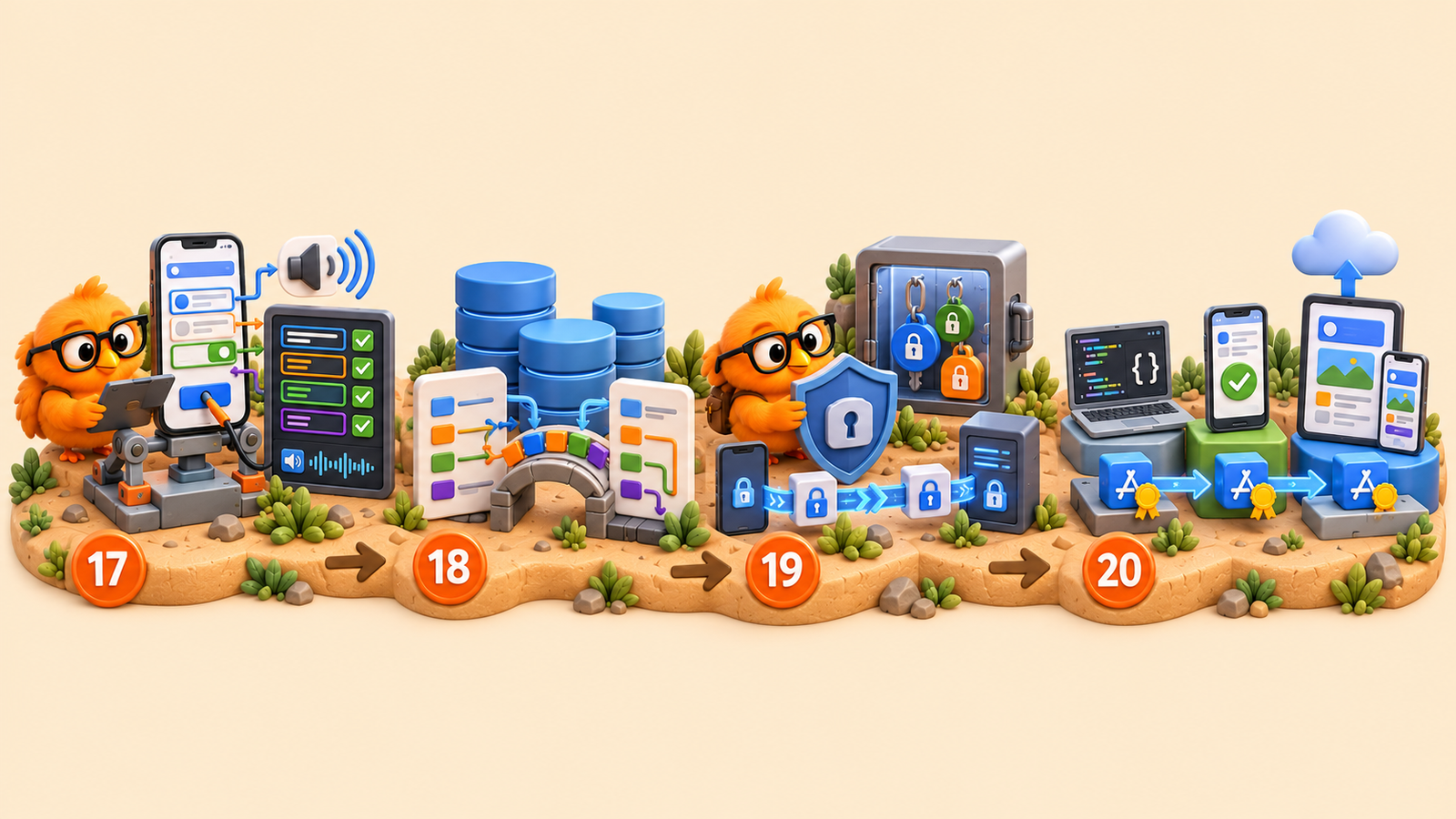
17. Testing
If the app compiles, it has passed the compiler’s checks. That does not prove it does the right thing. Tests let us verify rules, integrations, and user journeys, then repeat those checks when something changes. This includes UI tests that navigate screens and perform actions, as well as accessibility tests to check what VoiceOver announces, in what order, and how it responds when someone interacts with controls. An interface can work by touch and still make no sense to someone listening to it. We also need to test empty data, errors, and less convenient situations. If AI generates the tests, we need to check that their expectations reflect the behavior we want—not that the code and its tests share the same mistake.
18. Databases: SwiftData
In-memory state disappears when the app terminates. Information that needs to survive requires persistence. SwiftData provides tools for working with models, relationships, and queries, but we still have to decide what to store and how its structure will evolve. An update should not cause existing users to lose their data. That is why migrations are part of the problem to solve, not a surprise we leave until release day.
19. Data and communication security
What data do we collect? Who can access it? Where is it stored? Security starts with answering those questions, not with adding a layer at the end. Encrypted communications, properly stored credentials—such as tokens in the system keychain—and minimal permissions are part of the work. So is keeping secrets out of an app we are going to distribute. Data still needs protection even if no person has read the code handling it.
20. Deployment environments
The app running in the simulator is not yet the app that will reach the user. We need to manage development, testing, and production configurations so we do not mix up services or data. We also need to handle code signing, distribution, and checks on real devices. TestFlight helps us validate builds before releasing them. And yes, the final configuration needs checking too: testing against a development server does not prove the production build works.

21. App Store metadata and publishing
The path ends with presenting the product accurately: its name, description, screenshots, privacy information, and the details needed for review. That listing is part of the experience too. Promising something the app does not do, or misrepresenting how it uses data, cannot be fixed by a good binary. Publishing means delivering an app and explaining honestly what people get when they choose to download it. There is also a landing page to build, support to provide, privacy information to prepare… the work does not end with the app itself.
The path is still there
You do not need to master these 21 areas before starting. Nor does every app need the same depth in each one. But using AI does not make the fundamentals optional, and delegating implementation does not remove the decisions embedded in it. Some steps happen alongside one another; others force us to revisit earlier work. That is part of development too.
This is the way whether we write the code ourselves or direct a tool that writes it for us. There is no alternative route that makes data, user experience, quality, or security unnecessary. There are different ways to do that work.
AI can save us from writing a lot of code. It cannot make what that code does irrelevant.